You can control which users can see the event by adding and/or removing users from the User Access area:
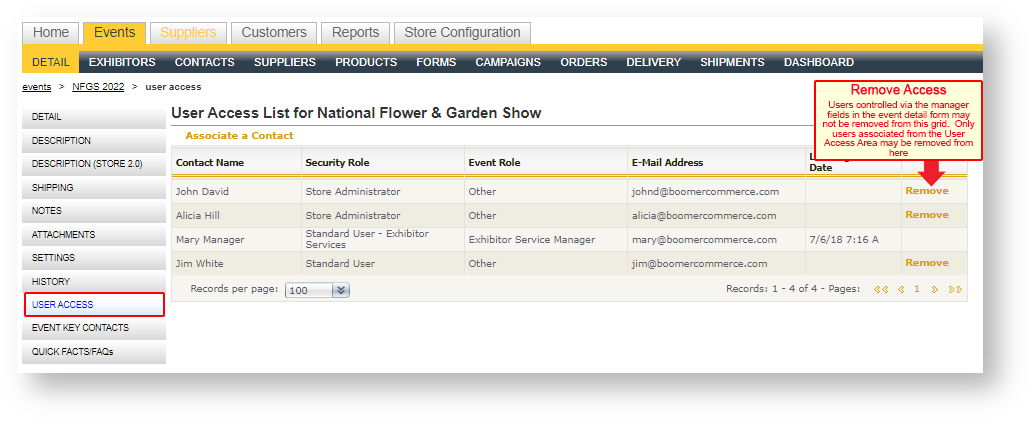
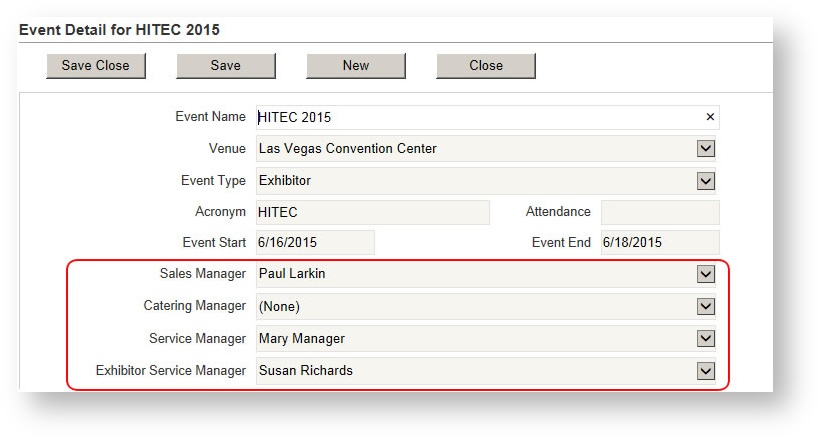
By default, the users that have been selected in the event detail form will appear here. Access for those special roles are not controlled by the User Access grid and instead are controlled by the manager fields on the event detail form. To grant or remove access, simply change those users in the manager field:
To grant access for additional user(s):
- Click "Associate a Contact" above the User Access grid.
- Use the picklist to filter and select the user by moving them from the left side of the picklist to the right.
- Click "Apply Selection". The user now appears in the User Access grid.
To remove access for additional users(s), click "Remove" in that user's row.
Remember, if you do not see Remove in a user's row, that user is listed as a manager on the Event Detail form and should be removed by changing the user in the manager field.