If you are a store administrator, you have access to managing the available shipment keywords in store configuration. These keywords include the following (the indented values represent the default values):
| Field Name | Description |
|---|---|
|
Shipment Special Handling Classifications |
Ground Unloading Side Door Unloading Constricted Space Unloading Designated Piece Unloading Stacked Shipments No Documentation Multiple Shipments Mixed Shipment |
| Small Package Item Types | Cartons Envelope |
| Shipment Item Types | Cartons Crates Skids/Pallets Fiber Cases Carpets Carpet Pads Machines Trunks Pad Wrapped Other |
| Shipment Item Conditions | Good Wet Crushed Damaged Opened |
| Small Package Carriers |
UPS Fedex DHL Yellow Freight System RPS |
| Freight Carriers | UPS Fedex Yellow Freight System POV |
| Cartload Carriers | POV |
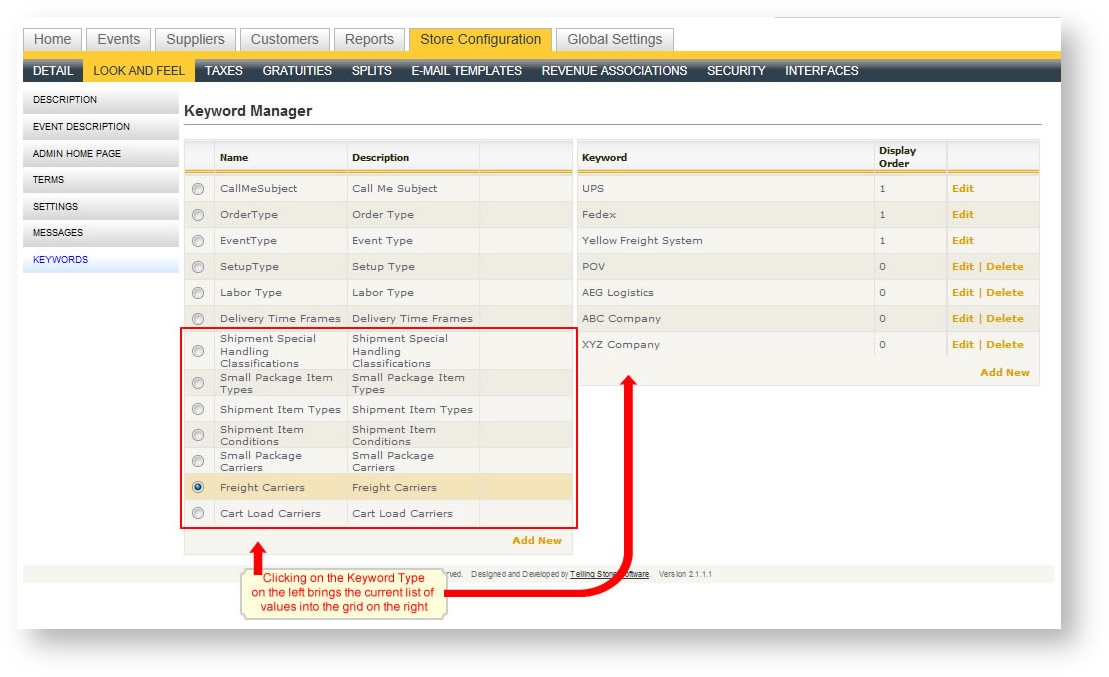
To add or more a value from one of these keywords:
- Click on the Store Configuration tab.
- Click on Look and Feel.
- In the left hand navigation menu, choose Keywords.
- Click on the Keyword value on the left you want to change. The list of available values appear on the right.
- Make any adjustments you want to the list on the right.