There are two tabs related to defining a supplier's detail information:
Summary Tab
For each supplier, a detail page provides a place to enter address information and set other configuration options:
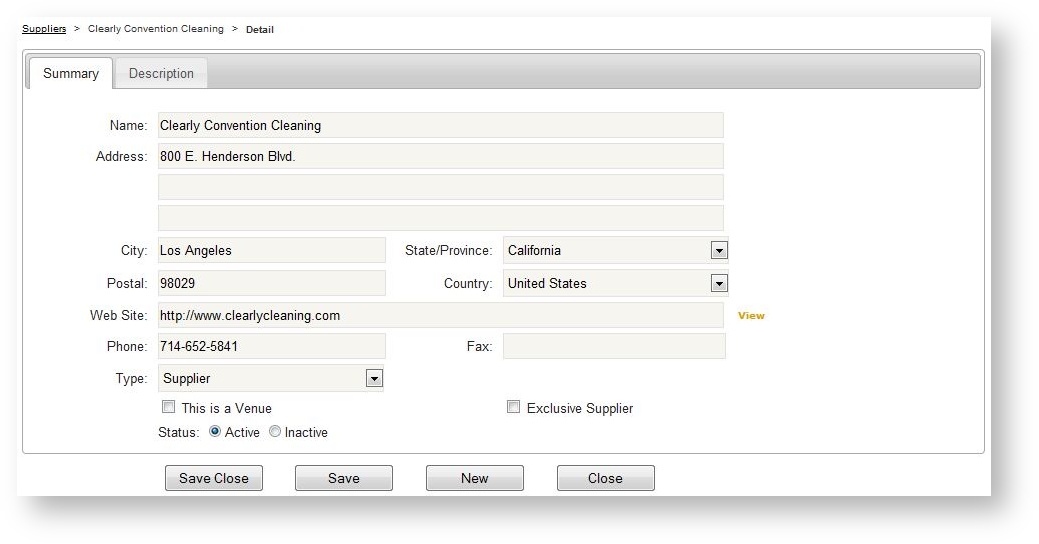
| Field Name | Description |
|---|---|
| Name |
Official company name of the supplier. |
| Address |
Three lines for the physical street address. |
| City |
Company city. |
| State |
Company state (values in this drop down are dependent on the Country field's value).
|
| Postal |
Company postal. |
| Country |
Company country. |
|
Web Site |
The supplier's main marketing web site, for reference only. |
|
Phone |
Company phone. |
|
Fax |
Company fax. |
| Type |
Supplier or General Service Contractor. While both of these types are actually "Suppliers", if a supplier is marked as a General Service Contractor in this field, this organization becomes an available selection in the General Service Contractor field in an event. |
| This is a Venue |
If checked, this this organization becomes an available selection in the Venue field in an event. |
| Exclusive Supplier |
If checked, this supplier (and all its products marked to be available) will automatically be associated to any newly created event. |
| Status |
Active/Inactive. Allows a supplier to be "retired" rather than deleted if they no longer have a relationship with the store but there were previously orders containing the supplier's products. This setting is store-specific so making a supplier inactive is effective for the store in which the Admin user is in at the time the supplier is made inactive. |
Description Tab
The description tab for a supplier is not currently used on the storefront and is there for a future release.