Split Rules define the commission agreement with a third party supplier. They may be defined for each revenue type and by either an amount or a percentage of that revenue type.
Tip
Splits are defined from the store's perspective. If a vendor has a 45% commission on a category of products, enter 55% into the split rule. You are defining the the revenue you keep.
If you have modified pricing in the event for which you want to report splits or commissions, then you must define the splits/commissions within the event itself. Boomer will ignore splits defined at the supplier level in that case. To learn how to set up splits/commissions for products within an event, see this video: Setting Up Split Rules.
By default, each revenue type populates the Split Rules grid:
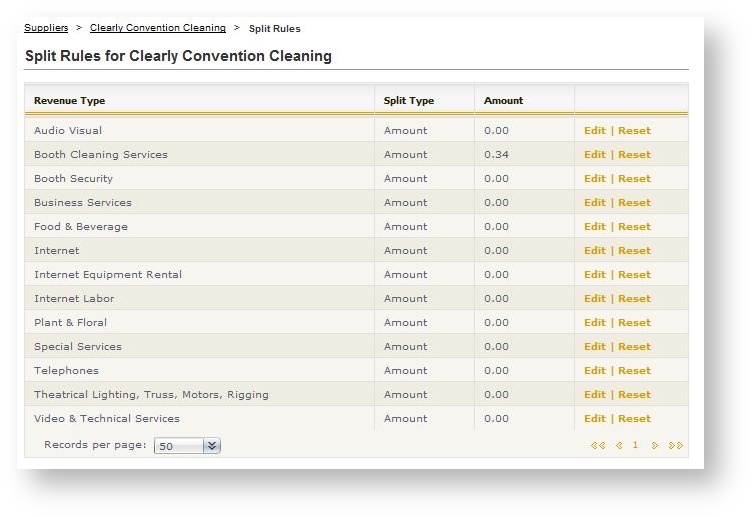
To indicate a supplier has a split for a given revenue type, click Edit. The split rule's detail appears:
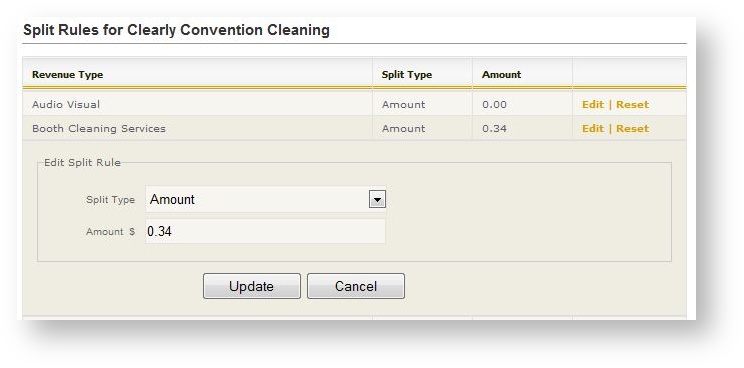
1. Select the split type in the drop down field.
2. Enter the amount, either as a dollar amount or a percentage based on the split type defined in Step 1.
Enter percentages as a whole number. Do not put a decimal or you are defining a split as less than one percent!
When the supplier is associated to an event, any split types defined here will be the default but may be changed within one or more products for an individual event if necessary.