-
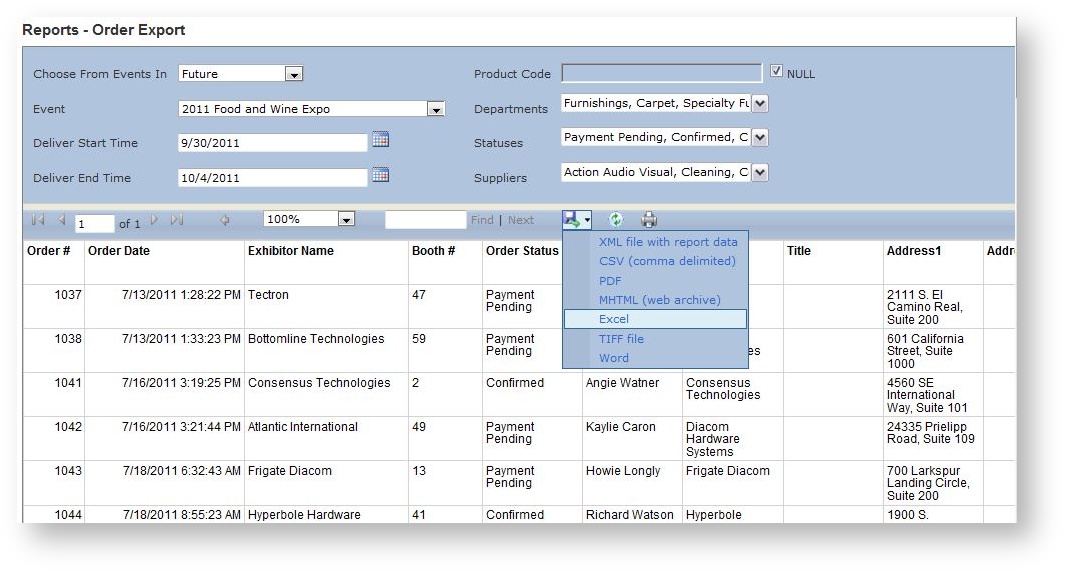
For a given date range, this report provides a flat list of all orders for an event in a format that is Excel friendly. To export to Excel, once the report is run, click on the blue disk in the report parameter area and choose "Excel":
-
Field Name Available Values Default Choose From Events In Event Years Future Event Any event in the system.
None Status(es) Payment Pending
Confirmed
Cancelled
ClosedPayment Pending
Confirmed
ClosedProduct Code
Any specific product code
None Order Start Date Any date Beginning of time.
Order End Date
Any date Today Deliver Start Time
Any date Event's Move-In Date, or Event Start Date if no Move-In Date. Deliver End Time Any date Event's Move-Out Date, or Event End Date if no Move-Out Date. Order Modify Start Date/Time Any date Beginning of time. Order Modify End Date/Time Any date Today Item Modify Start Date/Time Any date Beginning of time.
Item Modify End Date/Time Any date Today Revenue Type(s) The revenue types defined in the system. All Location(s) All locations defined in the event. All Pavilion(s) All Pavilions defined in the event. All Product(s) All products available in the event. All Suppliers
All Active Suppliers. All Active Suppliers (if only a sub set is chosen, the events included in the report will be based on whether the selected supplier(s) are associated with the event. -
Get in touch
-
<% blocks.forEach(function(block, index) { %>
-
<% if (imageHeight) { %>
<% } %>
<% if (block.name) { %><% if (block.html_url) { %> <%= block.name %> <% } else { %> <%= block.name %> <% } %>
<% } %> <% if (block.description) { %><%= block.description %>
<% } %>
<% }) %>