-
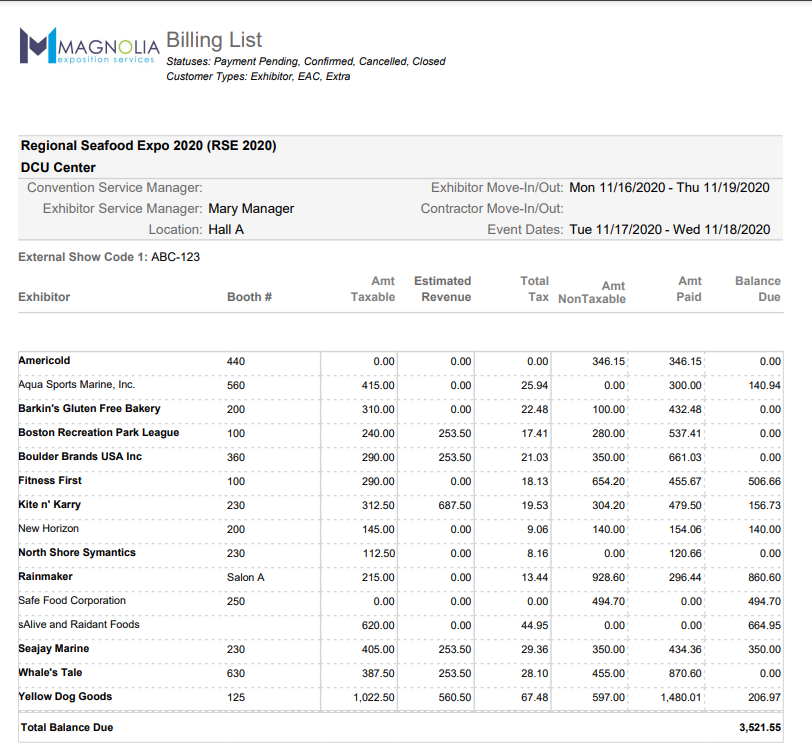
For a given event, this report provides a balance due for each exhibitor. You can optionally filter on balances between two amounts. It includes a total as well as a breakdown of taxes and any service charges. Since Exhibitors may have multiple orders, the report provides a parameter that determines whether a row totals all orders for each exhibitor or whether each order is a separate row in the report.
A particularly useful parameter for this report is the "Show Order Details". Exhibitors can have multiple orders within a single event, and by default the report provides a single summary row for each exhibitor. Setting the "Show Order Details" to "Yes" will return a row per order as opposed to a summary row for each exhibitor. If a credit card exists on file in at least one of the orders for the exhibitor, that exhibitor's name will be bold.
The Billing List does not provide complete revenue totals. For a more detailed version of this report, try LINK Event Revenue By Exhibitor Including Estimated report.
-
Field Name Available Values Default Event Any event in the system
None Status(es)
Payment Pending
Confirmed
Cancelled
ClosedPayment Pending
Confirmed
ClosedList Individual Orders
Yes
NoNo Customer Type(s) All defined customer types in your system
Exhibitor (not including show management)
Sort By Exhibitor, Booth Number
Exhibitor
Balance Minimum Any numeric value
None
Balance Maximum Any numeric value
None
-
Get in touch
-
<% blocks.forEach(function(block, index) { %>
-
<% if (imageHeight) { %>
<% } %>
<% if (block.name) { %><% if (block.html_url) { %> <%= block.name %> <% } else { %> <%= block.name %> <% } %>
<% } %> <% if (block.description) { %><%= block.description %>
<% } %>
<% }) %>