Events
- New link icon in the description area that allows you to create a link to a file uploaded for exhibitor access. See video here for details. Icon found here:
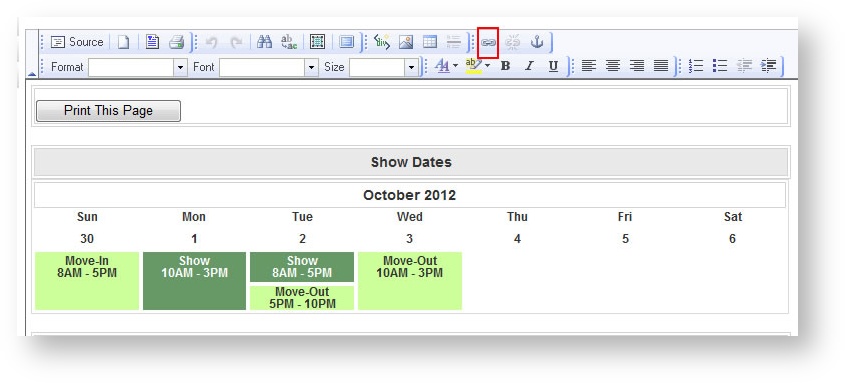
- Contractor Move-In and Contractor Move-Out dates have been added to the Event Detail form. The old Move-In/Move-Out dates represent the Exhibitor Move-In/Move-Out dates. Labor items may be scheduled anywhere within the Contractor Move-In/Move-Out periods.
- The E-mail Campaign "Choose Contacts" picklist defaults to choosing the "Main Contact" of the event only during the send of a campaign rather than all contacts that get associated to the event when an exhibitor is associated.
Orders
- No longer wrongly get the message that "your quantity is too high" when adding an item with an extremely large quantity to an order.
- Labor items no longer incorrectly calculate when making subsequent edits to the item.
Shipments
- If a small package is overweight, the minimum CWT weight value to the calculation will be applied.
- Slider issues in the Checkin and Unload date fields in IE 9 have been corrected.
- The freight "explanation of charges" no longer shows a decimal on the minimum weight amount.
- The carrier no longer defaults to the first one in the list and the user is forced to choose one before saving.
Reports
- Column on the Invoice and Work Order reports run from the Reports menu to indicate whether the product was ordered in the advance ("AD") or standard ("ST") pricing period.
- Minor adjustments to the Receiving Report making the format more organized for manual notes.
- Shipment Weight Recap grouped by date with totals by day as well as a grand total.
- The Event Header is repeated at the top of each page in the Pull List.
- No longer get EventID parameter value error when trying to run an Export Exhibitor List report for a previous event.