The development cycle for this release was shorted by a month so that we could deliver an important fix for the Internet Explorer 11 issues, which seemed to escalate in priority with each passing day as admin users and exhibitors alike were automatically upgraded to Internet Explorer 11 without even realizing it.
General
- Issues related to Internet Explorer 11 have been resolved and users will no longer need to run in compatibility mode for certain buttons and links to work.
- There is a new HTML Editor in all areas where there is a description area and free form typing (i.e., store, event, product). This was required because the old HTML editor was not supported in Internet Explorer 11. The editor has primarily all the same features as the old editor had. There is one difference in the way background colors are applied. We will supply a brief video tutorial prior to the release this weekend.
- When addresses are entered for exhibitors, contacts and payments, the country defaults in based on the country defined in the store's detail form.
Store
- Make a specific payment gateway the default in a store (if you have more than one store). Telling Stone will take care of setting this up once you are upgraded.
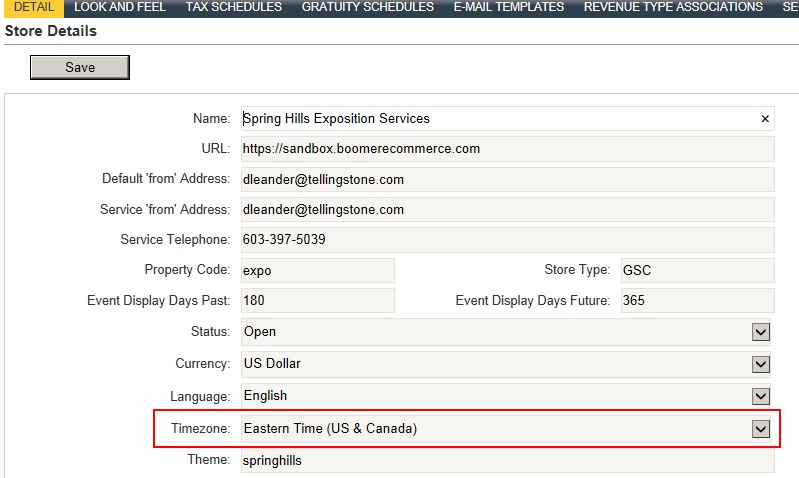
- Time Stamps in all areas in Boomer (including the report execution date/time stamp) should now abide by the time zone set in your store. If times do not reflect your time zone, check to be sure your time zone is set properly:
Events
- The email campaign date/time sent abides by your store's time zone setting.
- The date/time a contact received an email campaign has been added a column in the Contacts grid under an email campaign.
- The booth sort algorithm now correctly sorts a booth number with a character immediately after (example - 223C).
Contacts
- The last login date for customer and admin contacts now displays the year as well as month and day.
Orders
- When adding an item to an order, the short description of a product rather than the long description of a product is displayed on the ADMIN side only. This will provide Admin users with less "stock" or "fluffy" text to scroll through before clicking the Add to Cart and/or Add and Pick More buttons.
Email Templates
- The standard Customer Invoice and Customer Invoice with Discount email templates now have a column to indicate a product's price as Advanced (AD) or Standard (ST). Note that if you have a customized invoice template, you will not see this change.
Reports
Changes to Existing Reports
- The Accounts Payable/Accounts Receivable no longer shows cancelled orders with a zero balance.
- The Work Order no longer prints a blank page at the end.
- For specialty suppliers who have delivery/setup fees, those fees will not not clutter up any delivery or work order related reports. Only true products will appear on delivery related reports.
- Run the various Exhibitor Labels reports for all exhibitors, or just those exhibitors who have orders.
Storefront
- If desired, rename the names of the labels in the "Links" box. This includes "Terms and Conditions", "Event Web Site" and "Form Library". This requires assistance from Telling Stone; if you would like these values changed, please email Debbie Leander at dleander@tellingstone.com.
- Once the Storefront Lock Down Date has passed, the user will not be able to see the "Add to Cart" button at all.