Release date: January 1, 2022
Admin Portal
Navigation
1) The event detail menu (the dark blue menu when an event has been opened) has changed slightly. The options have been reordered and Email Campaigns has been shortened to Campaigns in preparation of other menu options coming in the future.

2) A new main menu tab has been added called Message Queues:

The email queue that used to exist under Global Settings has been moved there so that a user does not need full Store Administrator rights to access the email queue. It is controllable via security and by default is available to anyone with Store Administrator rights.
Events
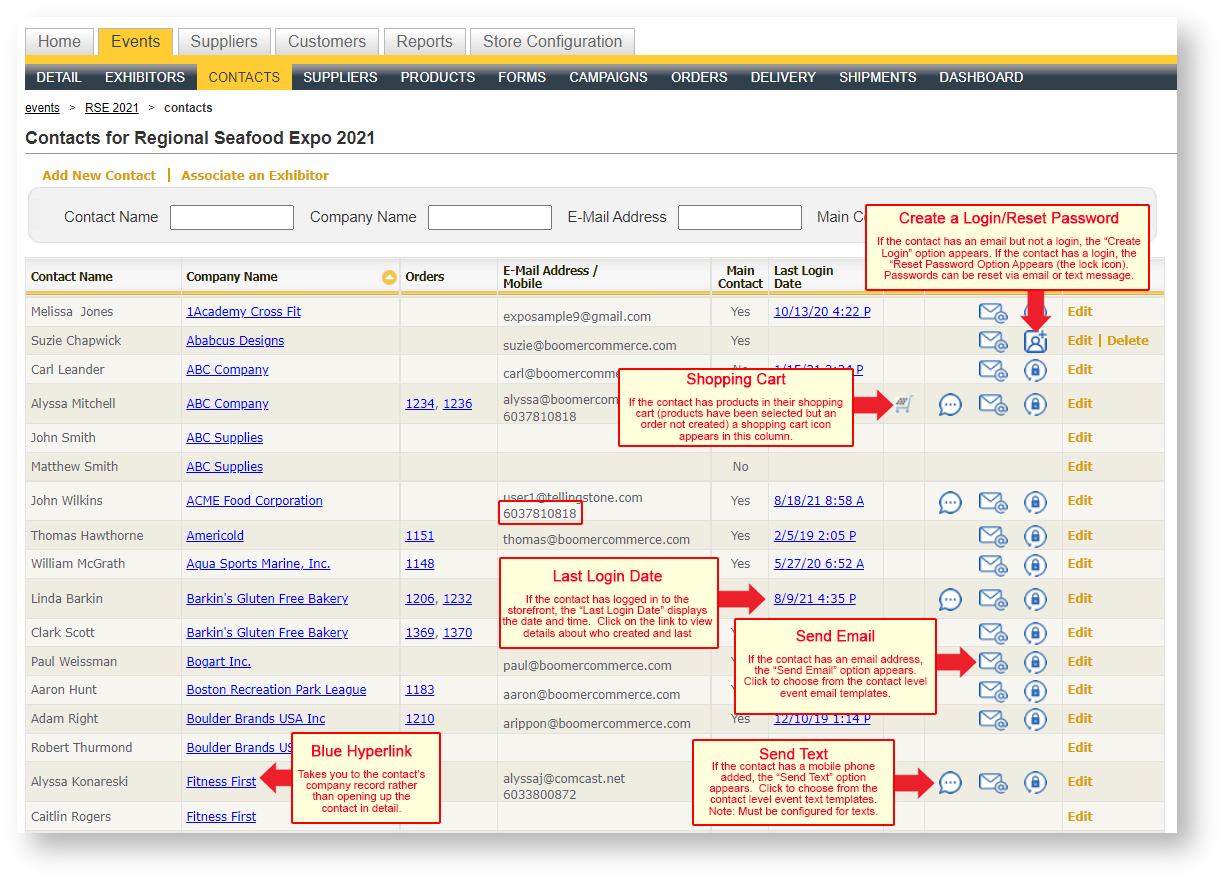
- The Contacts grid has icons instead of text labels for creating a login, resetting a password, and sending an email.
- Instead of an admin’s contact phone number, the mobile number is displayed.
- When an email campaign is sent, a footer is appended to each recipient's email. It contains the required the email options for the user based on GDPR compliance. The options include the following:
- An accurate physical mailing address in the body of the email, an address where unsubscribe requests can be physically mailed;
- A clear and conspicuous unsubscribe link; and
- A link to your organization’s privacy policy applicable to emails you send to recipients.
Contacts
- Send text messages to a contact from within Boomer (note: requires signing up for a text message service independent of Boomer). If you are interested in the details of this feature, please email support@tellingstone.com.
- A New option called "Clear All Shopping Carts" allows you to delete the contents of all contacts' shopping carts in the event.
- "Send Email" and "Reset Password" options have been added to the top of the Contact detail form. These behave the same as they do in the grid.
Orders
- The default number of rows in the History grid has been changed from 50 to 100.
Bills of Lading
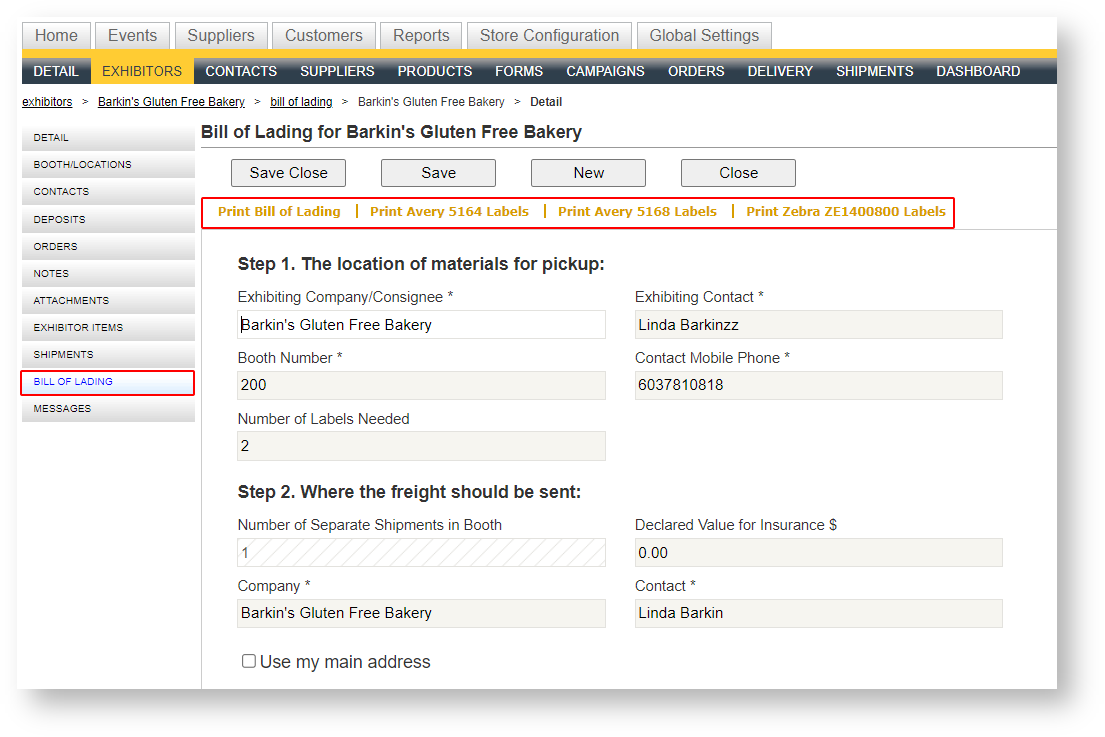
- When a BOL is created or modified on the storefront, an email notification is triggered to notify the exhibitor service manager of the event to which the BOL is connected. If there is no ESM assigned, the notification is sent to the default admin store email address.
- A new phrase that reads “Complete and return all copies to the Service Desk once all materials are packed, labeled and ready for shipment” has been added under the title of the report.
- Label of the field “Exhibiting Contact Phone” has been changed to “Contact Mobile Phone” to make it clearer which phone number the field represents.
- Label option for the Zebra ZE1400800 format has been added as an option.
Reports
New Reports
- Work Order - Show Organizer (Landscape). Behaves exactly as the portrait version does except the pages are landscape.
- Zebra ZE1400800 labels. Ability to print labels for one or more bills of lading from the grid within a customer.
New reports are not always available by default. If you are interested in exposing one of the new reports available, please email support@tellingstone.com.
Changes to Existing Reports
- Revenue Summary.
Change the list of suppliers to only suppliers with products. - Bill of Lading- Blank Form
Offers check box options depending on the Return to Warehouse setting defined in the event. - Work Order- Show Organizer
Created a horizontal version. Reach out to support if interested.
Other
If you are interested in setting up public kiosks on the show floor that allows Boomer to log into your storefront to place orders or submit payment, there is now a "Kiosk" mode that allows for this. When in "Kiosk" mode, the user will be logged out very quickly with inactivity, and will not be able to exit the browser page and navigate to any other place on the PC. It is your responsibility to ensure the PC on which the kiosk storefront is housed is secure, locked, and inaccessible in any way to the public. For more information, see UPDATELINK Boomer Kiosk.