For details on complete order management, including how to create, modify and cancel orders, see the main Orders section.
The orders grid within an event lists all orders that have been placed:
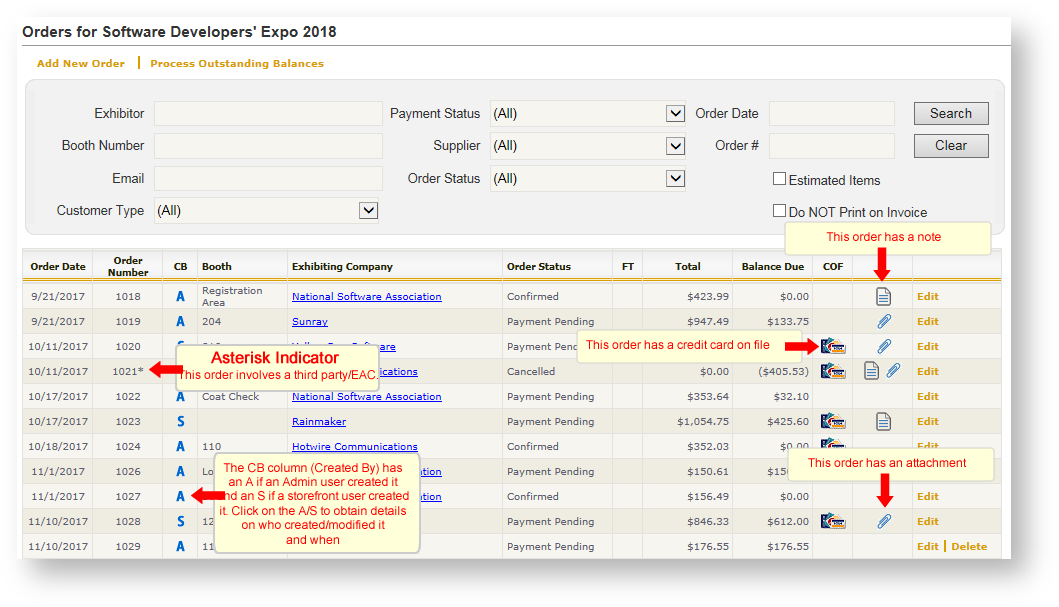
Use the filters at the top of the grid to search and/or narrow the contents of the grid based on your needs.
Most of the columns in the orders grid are self-explanatory; however a couple of the columns warrant explanation:
| Field | Explanation |
|---|---|
| Order # Asterisk | If the order # has an asterisk, that means the order is a third party/EAC order. In other words, the person and company placing the order is not the same as the exhibiting company. |
| FT | Stands for "Failed Transaction". When there is a red X in this column, that means the order contains a failed payment transaction. Once the transaction failure is corrected, the red "X" will no longer appear |
| COF | The order has a credit card on file. |
| Paperclip Icon | There some kind of attachment connected to this order. To view, double click the paperclip icon. |
| Note Icon | There is a note attached to this order. To view, double click the paper icon. |