Storefront
Several improvements have been made to the storefront to make the online experience for your customer easier. Watch the 3 minute video below for details.
Event
- New event calendar displays your events in graphical format (accessible from the main Events tab). See this help topic for details: Events Calendar.
- Send an email to an event contact directly from the Contacts grid. See this help topic for more information. Contacts.
- Improvements to the behavior of the new editor.
- The Exhibitor List Import supports booth numbers/values that are greater than 25 characters.
- Event Type has been added to the detail form. The default can be set under Store Configuration\Look and Feel\Settings but most Boomer users will want it set to the default, which is Exhibitor. The second option is Meeting. When Meeting is selected, you can add an Account and Contact directly on the event form, and the order summary information has fields for setup, counts and start/end times. This functionality will be used mostly by venue customers.
Orders
- Optional PO Number has been added to the Customer Detail screen.
- The issue with the Gratuity exempt flag on a custom item not working has been resolved.
- A new check box in Step 1 of creating an order allows the user to indicate if the order has dates and times (such as in the case of work orders):
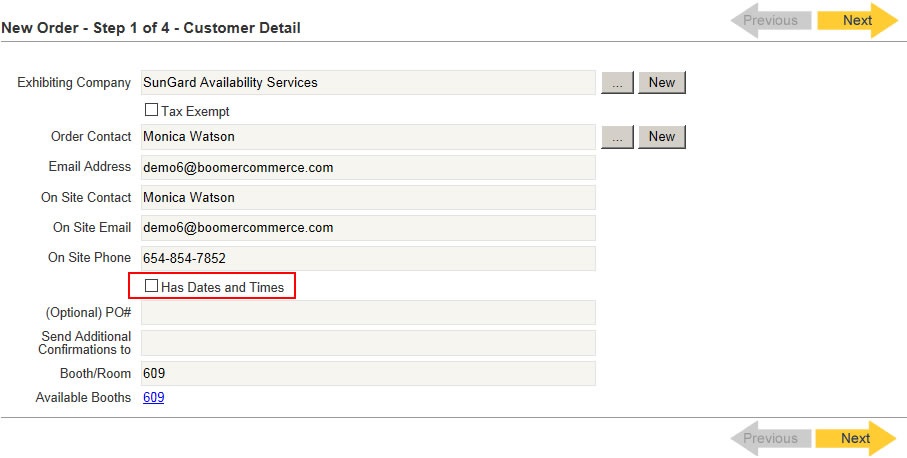
Play the below video for a brief of the feature and the related work order report improvement:
Other
- There is a new filter called "Is Bundle" above the products grid under a supplier.
- Bundle enhancements which allow you to define an additional cost based on a user's selection as well as designating that revenue to a category other than the package's category.
- A new email template called "*Blank Template" has been added so you can more easily customize your messages. Follow these instructions to make a copy and customize templates: Customizing an Email Template.
Reporting
New Reports
New reports are not displayed in the grid of Reports by default. If one of these reports seems like it would be useful to you, contact Telling Stone to expose the report in your system.
- Event Orders. Primarily for venues who service catering out of Boomer, this report generates a banquet event order (BEO) like format that groups items based on customer, delivery date and delivery time.
- Order Summary. Generates a list of orders for a defined time period based on the date on which they have an item to be delivered. Most useful to Boomer customers who have delivery dates defined in specific items.
Changes to Existing Reports
- Work Order - Show Organizer has several changes:
- Ability to sort by date or location.
- Ability to print a "Recap" page which provides a summary list of all work orders. "Sections to Print" defaults to Both but can be changed to print either just the recap or just the detailed work orders.
- Individual work orders print the Install and Dismantle date/time fields if they have been defined in the Customer Info screen of the order.
- Invoices (both from the Reports menu as well as email templates) include event dates. They also include the PO # if one has been defined.
- Show Acronym and External Show Code 1 have been added directly under the event name on the Payments by Event and Revenue Type report.
- Event Export has a second format available. To see all events (as opposed to just those with revenue), change the "View" parameter to All Events.
- Products designated as "fees" (for example, a/v delivery/setup fees) do not show up on order and delivery reports. They also do not show up by default in the Delivery grid.